Blog

  • Z21 feedback in Python

    Z21 feedback in Python

    In this post we’ll look at how to capture feedback messages from a Roco Z21 DCC Control Center. Feedback from a model train layout is a precondition for automated control, e.g. to avoid collisions.

    Occupancy detection

    One of the ways the Z21 gets feedback is via occupancy detection. The layout is divided into different sections that are electrical isolated. A feedback detector monitors for each section if there is something on the track that consumes energy. Usually that would be a locomotive, but it could also be a passenger coach with built-in lighting. If such rolling stock is detected, the section is occupied. Otherwise it is considered free.

    Note that a “free” section could still contain rolling stock that does not consume any energy. So one has to be mindful with the design of the sections and how to interpret occupancy statuses.

    The mission

    We’re going to write a Python script that captures feedback messages from the Z21 while we drive a locomotive on the layout.

    The setup

    The setup consists of:

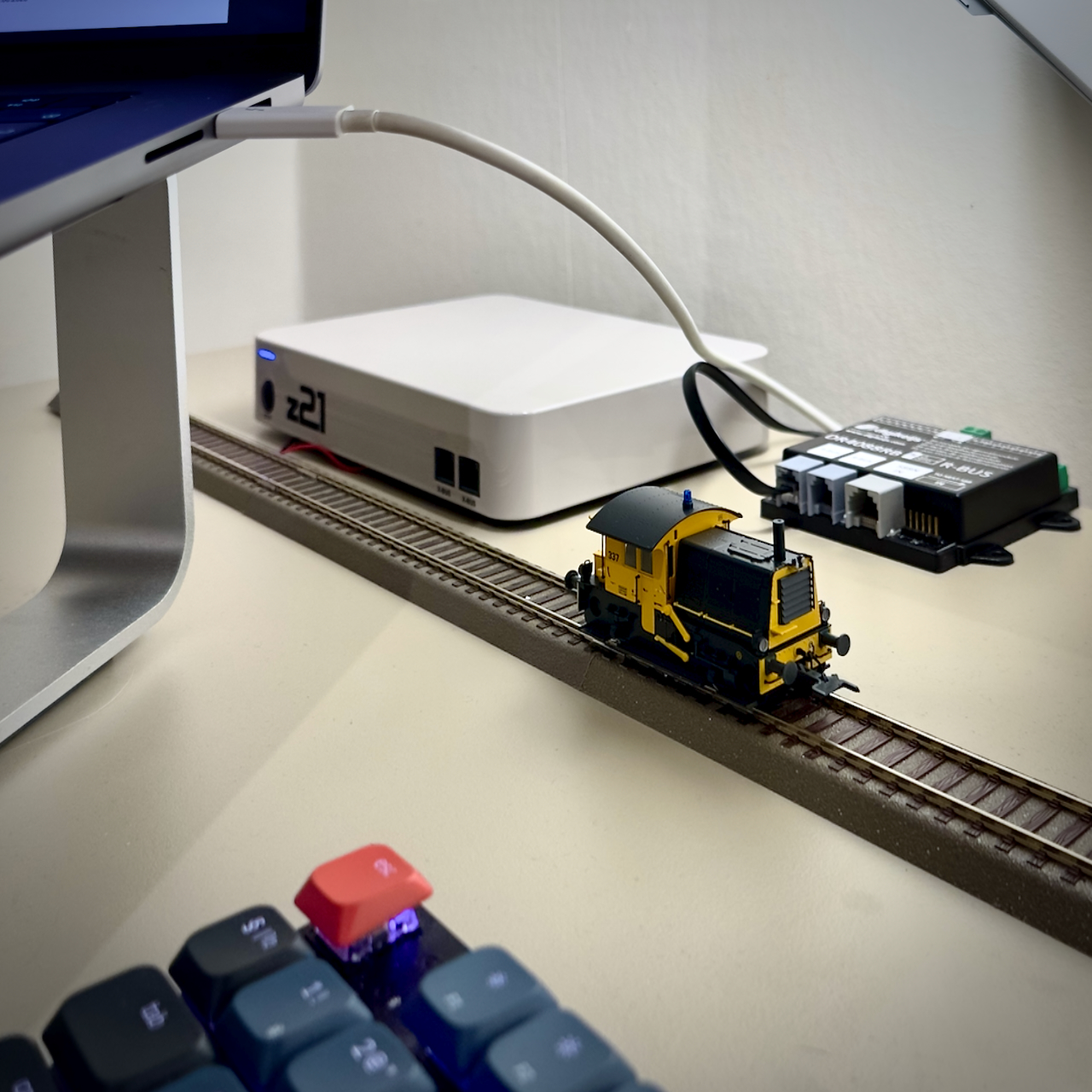
    • z21 (white), directly connected to my home network, using the default IP address: 192.168.0.111,
    • Digikeijs DR4088RB CS feedback module, connected to the Z21 via the R-bus and configured as module 1,
    • A straight track of 1,5 meters, split in three more or less equal sections: west (section 1), center (section 2) and east (section 3),
    • Apple MacBook Pro M1, running Mac OS 26.2 (Tahoe), connected to my home network,
    • Python 3.14.1, using IDLE as the development environment,
    • Apple iPhone 14, running iOS 26.2, connected to my home network and Roco’s Z21 app
    • A locomotive with DCC address 03.

    Note: Digikeijs is no longer in business. The feedback module is functionally comparable to the Roco 10819.

    Let’s cook!

    We’ll start off with the script that we created in the previous post, that:

    1. Creates the connection to the Z21
    2. Subscribes to feedback messages
    3. Creates the event loop
    4. Splits incoming messages into one or more data sets
    5. Prints the data sets to the console.

    Note that we update the command for subscribing to feedback messages: the data section of the command shall be 0x00010002. Also, we print the data set type explicitly to distinguish between the different types that we may receive.

    import socket
    
    def dispatch(data_set):
        header = data_set[2]
        if header == 0x40:
            return dispatch_x(data_set)
        if header == 0x80:
            print("LAN_RMBUS_DATACHANGED")
            return handle_lan_rmbus_datachanged(data_set)
        print("unknown header")
        return "unknown header"
    
    def dispatch_x(data_set):
        x_header = data_set[4]
        if x_header == 0x61:
            print("LAN_X 0x61")
            return "LAN_X 0x61"
        if x_header == 0xEF:
            print("LAN_X_LOCO_INFO")
            return "LAN_X_LOCO_INFO"
        print("unknown X-header")
        return "unknown X-header"
    
    def split_data_sets(input_string):
        if len(input_string) < 2:
            return []
        first_data_set_length = \
            int.from_bytes(input_string[0:2], \
            byteorder = "little")
        first_data_set = \
            input_string[:first_data_set_length]
        remainder = input_string[first_data_set_length:]
        return [ first_data_set ] + \
            split_data_sets(remainder)
    
    def handle_message(message):
        for data_set in split_data_sets(message):
            print("Data set: ", data_set)
            print("Data set type: ", hex(data_set[2]))
            dispatch(data_set)
    
    s = socket.socket(socket.AF_INET, socket.SOCK_DGRAM)
    Z21 = ('192.168.0.111', 21105)
    
    data_len = int.to_bytes(0x0008, \
        2, byteorder = 'little')
    header = int.to_bytes(0x0050, \
        2, byteorder = 'little')
    data = int.to_bytes(0x00010002, \
        4, byteorder = 'little')
    command = data_len + header + data
    s.sendto(command, Z21)
    
    while True:
        message, sender = s.recvfrom(1024)
        if sender == Z21:
            handle_message(message)

    Running the script

    We put a locomotive on the west section of the track and using the Z21 app we’ll drive it to the east section. When running the script in the mean time, we receive the following messages:

    Data set:  b'\x0f\x00@\x00\xef\x00\x03\x04 \x00\x00\x00\x00\x00\xc8'
    Data set type:  0x40
    b'\x0f\x00\x80\x00\x00\x03\x00\x00\x00\x00\x00\x00\x00\x00\x00'
    Data set type:  0x80
    Data set:  b'\x0f\x00\x80\x00\x00\x02\x00\x00\x00\x00\x00\x00\x00\x00\x00'
    Data set type:  0x80
    Data set:  b'\x0f\x00\x80\x00\x00\x06\x00\x00\x00\x00\x00\x00\x00\x00\x00'
    Data set type:  0x80
    Data set:  b'\x0f\x00\x80\x00\x00\x04\x00\x00\x00\x00\x00\x00\x00\x00\x00'
    Data set type:  0x80
    Data set:  b'\x0f\x00@\x00\xef\x00\x03\x04\x00\x00\x00\x00\x00\x00\xe8'
    Data set type:  0x40

    Data set type 0x40 is an XPressNet message as we saw in a previous post. However, type 0x80 is new: the name of it is LAN_RMBUS_DATACHANGED, according to the protocol specification. Let’s update our dispatch function:

    def dispatch(data_set):
        header = data_set[2]
        if header == 0x40:
            return dispatch_x(data_set)
        if header == 0x80:
            print("LAN_RMBUS_DATACHANGED")
            return handle_lan_rmbus_datachanged(data_set)
        print("unknown header")
        return "unknown header"
    
    def dispatch_x(data_set):
        x_header = data_set[4]
        if x_header == 0x61:
            print("LAN_X 0x61")
            return "LAN_X 0x61"
        if x_header == 0xEF:
            print("LAN_X_LOCO_INFO")
            return "LAN_X_LOCO_INFO"
        print("unknown X-header")
        return "unknown X-header"

    Apart from adding a few print statement, we have now added a check for the 0x80 header and will create a function for handling the LAN_RMBUS_DATACHANGED message.

    Handling the feedback message

    Let’s analyze these LAN_RMBUS_DATACHANGED messages further.

    The structure of this message type is:

    • DataLen: 0x0F, 0x00
    • Header: 0x80, 0x00
    • Group Index (1 byte), 0 or 1
    • Feedback Status (10 bytes).

    The feedback status is one byte per feedback module (assuming that the feedback module can handle 8 sections). Each bit within the byte represents a section of that module. The value for each bit is 1 if the section is occupied an 0 when it is free.

    Since the feedback status is limited to 10 bytes, this data set can contain the status for up to 10 modules. If more than 10 modules would be used, the Group Index byte will be set, to signify the status of modules 11 to 20.

    In our case, we are only interested in the module with address 1. This means that group index should always be 0 and we look at the lowest three bits of the first byte in the feedback status. Since we only have a single module in our layout, we can assume that Group Index is always 0.

    The function could look like this:

    def handle_lan_rmbus_datachanged(data_set):
        group_index = data_set[4]
        feedback_status = data_set[5:]
        if int.from_bytes(feedback_status) == 0:
            return
        module1 = feedback_status[0]
        section1_occupied = (module1 & 0b00000001 > 0)
        section2_occupied = (module1 & 0b00000010 > 0)
        section3_occupied = (module1 & 0b00000100 > 0)
        if section1_occupied:
            print("West occupied")
        if section2_occupied:
            print("Center occupied")
        if section3_occupied:
            print("East occupied")
        return

    And the output:

    Data set:  b'\x0f\x00@\x00\xef\x00\x03\x04 \x00\x00\x00\x00\x00\xc8'
    Data set type:  0x40
    LAN_X_LOCO_INFO
    Data set:  b'\x0f\x00\x80\x00\x00\x03\x00\x00\x00\x00\x00\x00\x00\x00\x00'
    Data set type:  0x80
    West occupied
    Center occupied
    Data set:  b'\x0f\x00\x80\x00\x00\x02\x00\x00\x00\x00\x00\x00\x00\x00\x00'
    Data set type:  0x80
    LAN_RMBUS_DATACHANGED
    Center occupied
    Data set:  b'\x0f\x00\x80\x00\x00\x06\x00\x00\x00\x00\x00\x00\x00\x00\x00'
    Data set type:  0x80
    LAN_RMBUS_DATACHANGED
    Center occupied
    East occupied
    Data set:  b'\x0f\x00\x80\x00\x00\x04\x00\x00\x00\x00\x00\x00\x00\x00\x00'
    Data set type:  0x80
    LAN_RMBUS_DATACHANGED
    East occupied
    Data set:  b'\x0f\x00@\x00\xef\x00\x03\x04\x00\x00\x00\x00\x00\x00\xe8'
    Data set type:  0x40
    LAN_X_LOCO_INFO

    This is to be expected:

    1. The locomotive starts in the west section. Since the message is only received upon a status change, there is no initial message that the locomotive is there.
    2. We then start driving, hence the LAN_X_LOCO_INFO message.
    3. When the locomotive starts and enters the center section, it has not yet left the west section. So it occupies both section.
    4. As the locomotive proceeds, it leaves the west section and only occupies the center section.
    5. Then the locomotive enters the east section without yet leaving the center section.
    6. Eventually the locomotive leaves the center section and occupies only the east section.
    7. Finally, we stop the locomotive and therefore we see another LAN_X_LOCO_INFO message.

    Note: after running some tests with different locomotives, I noticed that in some cases a lot of messages were received where all sections were marked as free. This is incorrect and they were immediately followed with correct messages. I’m not sure if this is a problem with the feedback unit, too small current drawn by too small a locomotive or something else. In order to avoid unwanted effects, I added a filter that ignores messages with no occupied sections.

    Conclusion

    We can now receive where the locomotive is on the layout at any time. Based on this information we can decide what we want the locomotive to do. Once we know how to control the locomotive, which we will discuss in a next article, we have all preconditions in place for fully automated train control!
  • A dispatcher function in Python

    Today we are going to develop a dispatcher function in Python. In earlier posts we received different types of messages from a Roco Z21 DCC Control Center. We stopped at printing the raw messages to the console. But we would like to have specialized functions that can interpret the different message types. For this we will need a dispatcher function.

    Mission

    We are going to develop a dispatcher function that can call specialized functions depending on the type of message we received from the Z21. Remember that while the length of a message is specified in the first two bytes (0 and 1), the next two bytes contain the message type.

    So we will have to create a dispatcher that calls other functions based on the value that we find in bytes 3 and 4 of the message. (Technically, only byte 3 is enough. Byte 4 is always 0).

    Let’s cook!

    In our first experiment we received the following message: the serial number that we had asked for.

    b"\x08\x00\x10\x00\xa3\xcf\x01\x00"

    We are going to do the TDD thing again, so we start with writing a test that verifies that the dispatch function will return LAN_GET_SERIAL_NUMBER if the third byte contains x10.

    def dispatch_test(test_name,\
            input_string, expected_result):
        actual_result = dispatch(input_string)
        if actual_result == expected_result:
            print(test_name, ": PASSED")
        else:
            print(test_name, ": FAILED")
            print("expected: ", expected_result)
            print("actual: ", actual_result)
    
    dispatch_test("LAN_GET_SERIAL_NUMBER", \ b"\x08\x00\x10\x00\xa3\xcf\x01\x00", \ "LAN_GET_SERIAL_NUMBER")

    As expected, the test will fail since we didn’t write the dispatch function yet. Let’s fix that:

    def dispatch(data_set):
        return "LAN_GET_SERIAL_NUMBER"

    Now it’s done. We know that this will be the (incorrect) outcome of any test later on for other message types, but we’ll fix that when the time comes.

    Now we’ll add another test. We received the following message before:

    b'\x07\x00@\x00a\x00a'

    Let’s analyze this a bit more using the following code:

    msg = b"\x07\x00@\x00a\x00a"
    print("length: ", hex(int.from_bytes(msg[0:2], \
        byteorder = "little")))
    print("type: ", hex(int.from_bytes(msg[2:4], \
        byteorder = "little")))

    The result is:

    length: 0x7
    type: 0x40

    T he type of this message is 0x40. This means that it is an X-bus command. Many commands that would normally come via a throttle (using the XPressNet protocol) are tunneled via the LAN connection. All X-bus commands have a main type 0x40 and an X-Header that specifies what message types they are. This means that we’ll have to write a second level dispatch function for this message type.

    For now, we are going to add the following test:

    dispatch_test("LAN_X", b"\x07\x00@\x00a\x00a", \ "LAN_X")

    In order to make this test, as well as the previous one pass, we’ll update the dispatch function as follows:

    def dispatch(data_set):
        header = data_set[2]
        if header == 0x10:
            return "LAN_GET_SERIAL_NUMBER"
        if header == 0x40:
            return "LAN_X"
        return "unknown message type"

    The last message type for now that we’re going to analyze is:

    \x0f\x00@\x00\xef\x00\x03\x0c\x80\x00\x00\x00\x00\x00`

    The output is:

    length: 0xf
    type: 0x40

    This is also a LAN_X message, so the code for the main dispatcher does not need to get updated to pass all tests.

    Second level dispatcher

    For the different LAN_X message types we’ll need a second level dispatcher. The first level dispatcher will call this new dispatcher for all LAN_X messages. The structure is similar to the first level dispatcher.

    Let’s look again at the message we analysed earlier. Now, we’re also going to look at the X-Header (and the DB0 data byte):

    msg = b"\x07\x00@\x00a\x00a"
    print("length: ", hex(int.from_bytes(msg[0:2], \
        byteorder = "little")))
    print("type: ", hex(int.from_bytes(msg[2:4], \
        byteorder = "little")))
    print("X-Header: ", hex(msg[4]))
    print("DB0: ", hex(msg[5]))

    Now, the output is:

    length:  0x7
    type:  0x40
    X-Header:  0x61
    DB0:  0x0

    This message type is called LAN_X_BC_TRACK_POWER_OFF and obviously triggered when I press the STOP button on the Z21 itself. When I pressed again, I received the message:

    b"\x07\x00@\x00a\x01`"

    The output of this is:

    length:  0x7
    type:  0x40
    X-Header:  0x61
    DB0:  0x1

    This message type is LAN_X_BC_TRACK_POWER_ON, which makes sense. X-Header 0x61 has various status messages depending on the content of DB0. If we’d need to handle this message type, we would need a third level dispatcher. For now, I’ll be happy with one handler function for X-Header 0x61.

    So we will replace the LAN_X test case for these message types with a new one as follows:

    dispatch_test("LAN_X 0x61", b"\x07\x00@\x00a\x00a",\
    "LAN_X 0x61")

    The test will fail because the actual result is still “LAN_X”, not “LAN_X 0x61”. We’ll fix that quickly, while creating a secondary dispatch function that is called from the first dispatch function:

    def dispatch(data_set):
        message_type = data_set[2]
        if message_type == 0x10:
            return "LAN_GET_SERIAL_NUMBER"
        if message_type == 0x40:
            return dispatch_x(data_set)
        return "unknown message type"
    
    def dispatch_x(data_set):
        return "LAN_X 0x61"

    Now we’ll go back to the other message we analyzed earlier:

    b"\x0f\x00@\x00\xef\x00\x03\x0c\x80\x00\x00\x00\x00\x00`"

    The output is:

    length: 0xf
    type: 0x40
    X-Header: 0xef

    This X-Header signifies that this is a LAN_X_LOCO_INFO message. The data section of the message describes the speed, direction and status of all kinds of functions that the locomotive may have.

    So we will add a test case:

    dispatch_test("LAN_X_LOCO_INFO", \
        b"\x0f\x00@\x00\xef\x00\x03\x0c\x80\x00\x00\x00\x00\x00`"\
        ,"LAN_X_LOCO_INFO")

    This test will fail until we enhance the dispatch_x function as follows:

    def dispatch_x(data_set):
        x_header = data_set[4]
        if x_header == 0x61:
            return "LAN_X 0x61"
        if x_header == 0xEF:
            return "LAN_X_LOCO_INFO"
        return "unknown X-header"

    An actual handler function

    For now, the dispatchers just returned the message types that they identified. The idea is that they are going to call handler functions for the different message types. For now, we’ll illustrate this with the LAN_GET_SERIAL_NUMBER message type, since we already have an implementation.

    We’ll update the test as follows:

    dispatch_test("LAN_GET_SERIAL_NUMBER", b"\x08\x00\x10\x00\xa3\xcf\x01\x00", \
        "LAN_GET_SERIAL_NUMBER: 118691")

    Then we create a function that extracts the serial number from the message:

    def handle_lan_get_serial_number(data_set):
        serial_number = int.from_bytes(data_set[4:], \
            byteorder = "little")
        return "LAN_GET_SERIAL_NUMBER: " + \
            str(serial_number)

    Finally, we’ll update the dispatch function so that it calls the new handler function:

    def dispatch(data_set):
        header = data_set[2]
        if header == 0x10:
            return handle_lan_get_serial_number(data_set)
        if header == 0x40:
            return dispatch_x(data_set)
        return "unknown header"

    And now the updated test, as well as all other tests that we wrote today, passes.

    Final code

    The final code for the dispatchers and handler functions and all tests are as follows:

    def dispatch(data_set):
        header = data_set[2]
        if header == 0x10:
            return handle_lan_get_serial_number(data_set)
        if header == 0x40:
            return dispatch_x(data_set)
        return "unknown header"
    
    def dispatch_x(data_set):
        x_header = data_set[4]
        if x_header == 0x61:
            return "LAN_X 0x61"
        if x_header == 0xEF:
            return "LAN_X_LOCO_INFO"
        return "unknown X-header"
    
    def handle_lan_get_serial_number(data_set):
        serial_number = int.from_bytes(data_set[4:], \
            byteorder = "little")
        return "LAN_GET_SERIAL_NUMBER: " + \
            str(serial_number)
    
    def dispatch_test(test_name,\
            input_string, expected_result):
        actual_result = dispatch(input_string)
        if actual_result == expected_result:
            print(test_name, ": PASSED")
        else:
            print(test_name, ": FAILED")
            print("expected: ", expected_result)
            print("actual: ", actual_result)
    
    dispatch_test("LAN_GET_SERIAL_NUMBER", \
        b"\x08\x00\x10\x00\xa3\xcf\x01\x00", \
        "LAN_GET_SERIAL_NUMBER: 118691")
    dispatch_test("LAN_X 0x61", b"\x07\x00@\x00a\x00a",\
        "LAN_X 0x61")
    dispatch_test("LAN_X_LOCO_INFO", \
        b"\x0f\x00@\x00\xef\x00\x03\x0c\x80\x00\x00\x00\x00\x00`"\
        ,"LAN_X_LOCO_INFO")

    Limitations

    • Clumsy structure. The dispatch functions handle only a few message types. The implementation with if statements, or alternatively match statements would become cumbersome if we implement support for more message types. There are more elegant and scalable solutions possible that map handler functions to message types, e.g. using a dictionary.
    • No isolated testing of dispatching functions. We tested the dispatching functions using strings that they returned themselves, or results from underlying handler functions. This results in tight coupling. We could use techniques like dependency injection for the dispatcher functions.
    • No specialized test cases for dispatch_x and handler functions. We test these functions implicitly by testing the dispatch function. If these functions would have been more complicated, their functionality should be tested separately.
    • No feedback messages. The messages we received are quite meaningless as long as we don’t receive any feedback messages. Insight in which sections of the layout are occupied at any given moment is critical for automated train control.

    Especially this last limitation is something we are going to work on next.

  • Listening for Z21 data sets

    Today we are going to listen for Z21 data sets in Python. In earlier posts we connected to the Z21, sent a first command and received and interpreted the related response. Now we are going to listen to different types of messages to get a feeling of how communication works.

    The mission

    We are going to control a locomotive to drive back and forth on a simple layout. We’re going to use a MultiMAUS throttle for this. We’ll connect the computer and print all messages that we receive to the console.

    The setup

    • z21 (white), directly connected to my home network, using the default IP address: 192.168.0.111,
    • Apple MacBook Pro M1, running Mac OS 26.2 (Tahoe), connected to my home network,
    • Python 3.14.2, using IDLE as the development environment,
    • Roco MultiMAUS throttle or iPhone Z21 app to issue commands.

    One would expect that a basic layout with a locomotive with DCC address 3 would be needed as well. However, DCC only sends signals to a locomotive and does not listen for acknowledgement. This means that for this test, no locomotive needs to be available to accept the commands that we will send with the throttle.

    Some theory: asynchronous communication

    Asynchronous communication means that there is no direct connection between a request and response. When we send a request for the serial number, the next message may be the response for this request. But if other things happen on the layout, the Z21 may send other messages first. This means that we have to apply an event driven approach which consists of:

    1. Subscribing to specific types of events
    2. Define handlers for these events
    3. Create an event loop

    Let’s cook: subscribe to Z21 messages

    Before we start listening to Z21 messages, we have let the Z21 know that we want to be informed about which types of messages. We’ll do this using the LAN_SET_BROADCASTFLAGS command. Sending such a command looks like this:

    import socket
    
    s = socket.socket(socket.AF_INET, socket.SOCK_DGRAM) 
    Z21 = ('192.168.0.111', 21105)
    
    data_len = int.to_bytes(0x0008, \
        2, byteorder = 'little')
    header = int.to_bytes(0x0050, \
        2, byteorder = 'little')
    data = int.to_bytes(0x00010000, \
        4, byteorder = 'little')
    command = data_len + header + data
    s.sendto(command, Z21)

    First, we create the socket so that we can start communicating with the Z21. Then we put together the command we want to send.

    The format of the LAN_SET_BROADCASTFLAGS command is as follows :

    • Data Length (2 bytes, little endian): always 8 bytes (0x008)
    • Header (2 bytes, little endian): always 0x0050
    • Data (4 remaining bytes, little endian): flags about which kind of message we’d like to subscribe to.

    For now, we’ll subscribe to the messages about the status of any locomotives on the layout. This is expressed by the value of 0x00010000.

    Finally we’ll put the command together and send it to the Z21.

    More cooking: handling incoming messages

    Once a message is received from the Z21, the handle_message function will split the incoming message into individual data sets. Remember that we developed a split_data_sets function for this earlier.

    After that, it will print each data set to the console.

    The code looks like this:

    def handle_message(message):
        for data_set in split_data_sets(message):
            print(data_set)

    Even more cooking: event loop

    Now we will have to start listening to incoming messages from the Z21 and processing the messages, repeatedly. The anatomy of such a function could look like this:

    Event loop:

    1. Receive event: capture message from Z21
    2. Handle event: process the message

    A quick and dirty implementation could look like this:

    while True:
        message, sender = s.recvfrom(1024)
        if sender == Z21:
            handle_message(message)

    The dirtiest way of creating a loop is one with no stop condition. In the loop we’ll listen for a message from a socket and verify that it was actually the Z21 that sent it. If so, we’ll split the message into a list of data sets and for each data set, call the event handler.

    The result

    When I used the throttle to control the locomotive, the program printed a number of data sets like the ones below:

    b'\x0f\x00@\x00\xef\x00\x03\x0c\xa8\x00\x00\x00\x00\x00H'
    b'\x0f\x00@\x00\xef\x00\x03\x0c\x94\x00\x00\x00\x00\x00t'

    Then I used the Stop button on the Z21 to shut off the layout and switch it on again. The program produced the following output:

    b'\x07\x00@\x00a\x00a'
    b'\x07\x00@\x00a\x01`'

    The final source code

    This is the full source code that we put together:

    import socket
    
    def split_data_sets(input_string):
        if len(input_string) < 2:
            return []
        first_data_set_length = \
            int.from_bytes(input_string[0:2], \
            byteorder = "little")
        first_data_set = \
            input_string[:first_data_set_length]
        remainder = input_string[first_data_set_length:]
        return [ first_data_set ] + \
            split_data_sets(remainder)
    
    def handle_message(message):
        for data_set in split_data_sets(message):
            print("Data set: ", data_set)
    
    s = socket.socket(socket.AF_INET, socket.SOCK_DGRAM)
    Z21 = ('192.168.0.111', 21105)
    
    data_len = int.to_bytes(0x0008, \
        2, byteorder = 'little')
    header = int.to_bytes(0x0050, \
        2, byteorder = 'little')
    data = int.to_bytes(0x00010000, \
        4, byteorder = 'little')
    command = data_len + header + data
    s.sendto(command, Z21)
    
    while True:
        message, sender = s.recvfrom(1024)
        if sender == Z21:
            handle_message(message)

    Limitations

    I think we have a good approach for capturing all Z21 messages. Areas for improvement are:

    • Stop conditions for the loop. Now we can abort with Ctrl-C on the keyboard but this only works if a message is received. We should find a better way.
    • Dispatchers for the data sets. Currently we just print the content of the received data sets on the console. We’ll need to develop handler functions for the different types of data sets and dispatcher functions to call these handlers.
    • Multiple ports. According to the published protocol, both ports 21105 and 21106 can be used. We’ll need to make sure that we will also listen to port 21106.

    We’ll work on that for the next projects!

  • A data set splitting function

    In earlier posts, we made a start implementing the communication protocol of the Roco Z21 DCC control center, in Python. We’ll take the next step in this post:

    The mission

    According to the published protocol specification, a single packet containing multiple data sets is equivalent to the same data sets in multiple packets. We’re going to write a function that splits the content of an incoming UDP packet into individual Z21 data sets so that each data set can be processed individually.

    The format of a data set is as follows:

    • DataLen: the first two bytes specify the length of the dataset (binary, little endian)
    • Header: the third and fourth bytes identify the command (again, little endian)
    • Data: the remaining bytes contain extra data, of which the meaning and quantity depend on the command.

    An example of a Z21 data set (in Python):

    b'\x08\x00\x10\x00\xa3\xcf\x01\x00'

    This data set has a length of 8 bytes, which is also specified in the first two bytes (0x0008). The header is 0x0010 which means it is a response to the LAN_GET_SERIAL_NUMBER command. The remaining bytes contain the serial number in hexadecimal format.

    Theoretically it is possible that this data set would be sent by the Z21 twice, in the same packet. In that case, the packet would look like this:

    b'\x08\x00\x10\x00\xa3\xcf\x01\x00\x08\x00\x10\x00\xa3\xcf\x01\x00'

    It would be up to our function to split this into two individual data sets into a list of two messages:

    [b'\x08\x00\x10\x00\xa3\xcf\x01\x00', b'\x08\x00\x10\x00\xa3\xcf\x01\x00']

    Note: normally the data sets would be different. There could be even more data sets in the packet, and hence, in the final list.

    Once the list is completed, the data sets can be processed in turn, just like if they would have arrived in individual packets.

    Let’s cook, the TDD way

    We are going to use a test driven development (TDD) approach for developing this function. In short this means:

    • Failed test. We write a test of the piece of functionality that we want to implement. Since we didn’t implement anything yet, the test will fail.
    • Passed test. We will write the minimal code that will satisfy the earlier failed tests. If we had any other previous tests that already had passed, they shall pass now too, of course.
    • Refactor. If the code that we just wrote can be cleaned up, we will refactor it. Of course we will execute the test again (including all previous tests), to make sure that we didn’t introduce any bugs.

    Then we continue with the next piece of functionality and follow the same cycle.

    Test code

    First, we’ll put together a simple test runner. It could look like this:

    def split_data_set_test(test_name,\
            input_string, expected_result):
        actual_result = split_data_sets(input_string)
        if actual_result == expected_result:
            print(test_name, ": PASSED")
        else:
            print(test_name, ": FAILED")
            print("expected: ", expected_result)
            print("actual: ", actual_result)

    This function requires a test name (for reporting), an input string that contains the packet that needs to be split, and an expected result. When we call this test function, it will call the split_data_set function with the string that we supplied. After that, this test function will compare the result of the split_data_set function (actual result) with the expected result as provided.

    Obviously, if the comparison is correct, the test passed. Otherwise, the test fails and both the expected and actual results are presented.

    Note: this is a very rudimentary testing framework that we just made up ad hoc. Many advanced frameworks are available for Python that we could and maybe should use instead. That will be something for another day.

    Single data set

    First, we are going to add the processing for a single data set. We just want to get the same data set back, but in a list, i.e. between square brackets in Python syntax.

    The test code for a single data set:

    split_data_set_test("single data set", \
       b'\x08\x00\x10\x00\xa3\xcf\x01\x00', \
       [b'\x08\x00\x10\x00\xa3\xcf\x01\x00'])

    To make this test pass, as well as the previous test, we had to enhance the code as follows:

    def split_data_sets(input_string):
        return [ input_string ]

    Simple enough, isn’t it?

    Multiple data sets

    Now the more challenging part. First the test, of course!

    split_data_set_test("multiple data sets", \
        b'\x04\x00\x01\x02\x06\x00\x10\x00\x10\x10', \
        [b'\x04\x00\x01\x02', b'\x06\x00\x10\x00\x10\x10'])

    We send in a long string, which will be split into two strings and wrapped in a list.

    The implementation could look like this:

    def split_data_sets(input_string):
        input_string_length = len(input_string)
        first_data_set_length = \
            int.from_bytes(input_string[0:2], \
            byteorder = "little")
        first_data_set = \
            input_string[:first_data_set_length]
        remainder = input_string[first_data_set_length:]
        if first_data_set_length == input_string_length:
            return [ first_data_set ]
        return [ first_data_set ] + \
            split_data_sets(remainder)

    First step is to determine the cut off point. Remember that the first two bytes of the data set specify the length of the data set. So we calculate the cut off point from these bytes. Then we split the input string into the first data set and a remainder. If there is any remainder left, we’ll use the magic of recursion to also split up the remainder.

    Too short data sets

    According to specification, a data set has a length of at least four bytes. The function would generate an error if the string would be less than two bytes. To make the function more robust, we can set a guard that just returns an empty list if we send too short a data set.

    Let’s add some tests:

    split_data_set_test("empty data set", '', [])
    split_data_set_test("too short data set", b'\x02', [])

    And the modified code:

    def split_data_sets(input_string):
        input_string_length = len(input_string)
        if input_string_length < 2:
            return []
        first_data_set_length = \
            int.from_bytes(input_string[0:2], \
            byteorder = "little")
        first_data_set = \
            input_string[:first_data_set_length]
        remainder = input_string[first_data_set_length:]
        if first_data_set_length == input_string_length:
            return [ first_data_set ]
        return [ first_data_set ] + \
            split_data_sets(remainder)

    Now, if the string is less than two characters, the function will return an empty list. No more errors!

    Refactoring time!

    Now that we added this guard, we can also use this guard to stop the recursion, since it is safe to start the recursion when remainder is an empty string. So we don’t have to make a decision whether or not call split_data_sets(remainder). Let’s try removing this if statement.

    def split_data_sets(input_string):
        if len(input_string) < 2:
            return []
        first_data_set_length = \
            int.from_bytes(input_string[0:2], \
            byteorder = "little")
        first_data_set = \
            input_string[:first_data_set_length]
        remainder = input_string[first_data_set_length:]
        return [ first_data_set ] + \
            split_data_sets(remainder)

    It works! All test passed. Here we see the power of TDD: we can experiment with optimizations and get immediate feedback in the sense of passed or failed tests. This encourages to clean up the code as much as possible, minimize complexity and maximize transparency.

    Final thoughts

    In this post we solved a functional problem with the Z21 communication protocol. We used TDD as an approach to develop an elegant and efficient solution of which the quality is proven using automated tests. Let’s try to apply TDD in other future experiments!

    We could harden the function even more, e.g. by adding guards against non-decimal values or data sets that are shorter than specified in the DataLen bytes. I don’t think that is necessary here, as we are only going to process data sets from the Z21. It is very unlikely that the Z21 would break its own protocol.

  • Connecting to Z21 from Python

    This post explains how a Python script connects and interacts with the Roco Z21 DCC Control Center. In a previous post I introduced the Z21 where I explained that a computer can connect to the Z21 via the network. This was a bit of theory. Now we’ll go hands-on!

    The mission

    We’re going to write a Python script that will query and display the serial number of a Z21.

    The setup

    The setup I use consists of:

    • z21 (white), directly connected to my home network, using the default IP address: 192.168.0.111,
    • Apple MacBook Pro M1, running Mac OS 26.1 (Tahoe), connected to my home network,
    • Python 3.14.1, using IDLE as the development environment,
    • Apple iPhone 14, running iOS 26.1, connected to my home network and Roco’s Z21 app.

    No layout or rolling stock are needed for this experiment.

    Let’s cook!

    This is the code necessary to retrieve the serial number of a Z21:

    import socket
    
    s = socket.socket(socket.AF_INET, socket.SOCK_DGRAM)
    s.sendto(b"\x04\x00\x10\x00", ("192.168.0.111", 21105))
    incoming_packet, sender = s.recvfrom(1024)
    print("Incoming packet: ", incoming_packet)
    print("Serial number: ", \
        int.from_bytes(incoming_packet[4:], \
        byteorder = "little"))

    And this is the result that I get:

    Incoming packet:  b'\x08\x00\x10\x00\xa3\xcf\x01\x00'
    Serial number:  118691

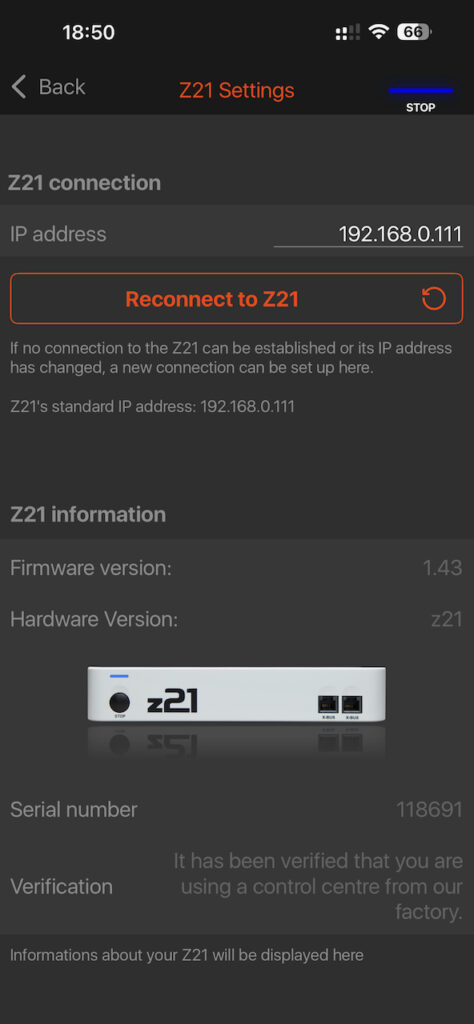
    The serial number is shown in the Z21 app as follows:

    Screenshot from Z21 app.
    Screenshot from the Z21 app on iPhone

    The serial number matches the output that I received from the Python script. Happy Days!

    In depth

    Let’s look at the Python script line by line, to see how it works:

    import socket

    First step, we’ll need to load the standard socket module to get access to networking facilities.

    s = socket.socket(socket.AF_INET, socket.SOCK_DGRAM)

    Then, we create a socket. Since the Z21 uses the UDP/IP protocol, the address family is IP (AF_INET) and the protocol type is datagram (SOCK_DGRAM). We refer to the newly created socket as s.

    s.sendto(b"\x04\x00\x10\x00", ("192.168.0.111", 21105))

    The socket contains a sendto function that takes a message and the destination as parameters. The IP address of the Z21 is 192.168.0.111 (default and confirmed by the screenshot above) and the port the Z21 listens to, is 21105 as per specification.

    The message is the request for getting the serial number. The structure for requests to, and responses from the Z21 is:

    • DataLen. The length of the message, in two bytes, little endian
    • Header. The type of request, in two bytes, little endian
    • Data. Extra bytes, depending on the type of request.

    For the request of the serial number, the header is 0x0010 (hexadecimal notation). There is no additional data for this request, so the length of the message shall be 0x0004 bytes. In little endian format, the request shall be 0x04, 0x00, 0x10, 0x00.

    incoming_packet, sender = s.recvfrom(1024)

    Now, we are going to wait for the response. When receiving data from the socket, we will get the sender information (IP address and port number), as well as a message. We’ll ignore the sender information for now.

    print("Incoming packet: ", incoming_packet)

    Let’s look at the message that we received: 0x08, 0x00, 0x10, 0x00, 0xa3, 0xcf, 0x01, 0x00. The first two bytes specify the length of the message (again, hexadecimal, little endian): 0x008, which is 8 bytes. The header is the same as the request: 0x0010. Contrary to the request, there is actually data in this message, 4 bytes.

    print("Serial number: ", \
        int.from_bytes(incoming_packet[4:], \
        byteorder = "little"))

    As a last step, we take this data, everything after the 4th byte, and convert it to an integer (again, the format is little endian). This turns the content of the data that was shown in hexadecimal format to a decimal format that we can relate to. And this is how we get to 118691 which is the actual serial number of my Z21.

    Limitations

    This code was quick and dirty, just to see if it works. Quick is nice, but dirty isn’t. This is where we cut corners:

    • Multiple senders. it is possible that something else than the Z21 sends a message to the socket. In that case, that message needs to be handled separately, or just ignored. Then we’ll have to start listening again for the message that we expected. So we’ll have to verify when we receive a message, that the sender was actually the Z21.
    • Asynchronous communication. The protocol is asynchronous, which means that the Z21 may send messages about status changes at any time, in any order. For example, a locomotive that was controlled by another throttle, changed speed, a turnout was changed, a locomotive entered a monitored section of the layout, or a short circuit on the track forced the layout to be switched off entirely. This means that we have to interpret every incoming message, decide how to handle such events and continue listening for the message we expected. This requires some sort of event driven approach.
    • Multiple responses in a single message. Now we received only a single response in the message. However, if the Z21 needs to send multiple responses, it can choose to combine these responses into a single message. We’ll need to write a function that takes a message and isolates the single or multiple responses before they can be processed.

    Conclusion

    We have demonstrated that we can establish meaningful communication with the Z21. We have studied how to connect, how to send requests and how to receive responses. And we have looked at the basic structure of these requests and responses.

    Now we can learn how to send more types of requests and interpret more types of responses. We can think of other properties as shown in the screenshot above, but also command locomotives, turnouts and check feedback from occupancy detection.

    While all this seems fairly straightforward, the complexity will increase significantly once we add logic for dissecting multiple responses in a single message and especially when we have to deal with the asynchronous nature of communication.

  • Overview of DCC with Roco Z21

    Overview of DCC with Roco Z21

    In this article I’m giving an overview of the Roco/Fleischmann Z21 DCC Center, with the aim of controlling model trains with a computer.

    Digital Control of model trains

    Typically, a model train is controlled by feeding a current via the rails the train runs on. Most manufacturers use a DC current via the two rails. Analog train control is done by varying the voltage (between 0 and 14 volt) that determines the speed and the polarity that determines the direction of the locomotive. This technique is simple and cheap to start with but brings a quite a few limitations:

    1. The power of the motor is limited with lower voltage, which results in that the locomotive stalls at low speeds
    2. At lower voltage, the locomotive is more sensitive for dust on the rails
    3. If the locomotive has lights, these are very dim at low speeds
    4. The lights cannot be controlled separately (the best one can get is front or back light determined by the polarity and hence, direction)
    5. No other electrical functions can be added to a locomotive
    6. All locomotives on the layout are controlled at once, with a single throttle
    7. A separate low voltage AC-network with physical switches a complicated wiring is needed to control turnouts and other accessories
    8. Not very scalable: battery packs or transformers used for feeding the network have limited power and cannot be enhanced.

    Note: some manufacturers use different systems. E.g. Märklin uses AC via 3 rails (actually 2 rails with contact points in the middle of the sleepers as a 3rd rail) for its H0-gauge and Trix used to use DC via 3 rails. They suffer from the same limitations.

    To alleviate all this, digital control was developed where a permanent, higher voltage was applied to the track (e.g. 18 volts) and digital communication with the locomotives was made possible by switching polarity back and forth. The most common protocol in use is DCC (Digital Command Control).

    A typical DCC set up requires the following components:

    • Control Center. Each layout needs exactly one Control Center that broadcasts commands to all locomotives and accessories
    • Decoder. Each locomotive or DCC-enabled accessory needs a decoder to interpret the broadcasted signals
    • Throttle. At least one throttle is needed to send commands to the locomotives and accessories of the layout. Multiple throttles can be used in parallel for controlling different locomotives
    • Booster. While providing the power for a section of a layout, it also forwards the DCC commands from the control center for its section.

    Note: Märklin uses a proprietary standard called MFX for digital control. Fleischmann used to use FMZ before. Some MFX or FMZ decoders can be used with DCC.

    Roco Z21

    Roco developed the Z21 family of DCC products, built around the Z21 Control Center. Four versions of the control center exist:

    • z21 Start (white). This is the simplest version that is included in a number of starter sets. It cannot be bought separately. A WLAN package needs to be bought separately to enable network access.
    • z21 (white). This is a limited version of the Z21 that is included in a number of starter sets and includes the WLAN package.
    • Z21 (black). This is the ‘official’ version with full functionality.
    • Z21 XL (black). This is the same as the regular Z21 version, but intended for larger scale model trains that require more current (6A vs 3A).

    Each version includes a power supply and functions as a primary booster. Additional boosters can be added via the B-bus.

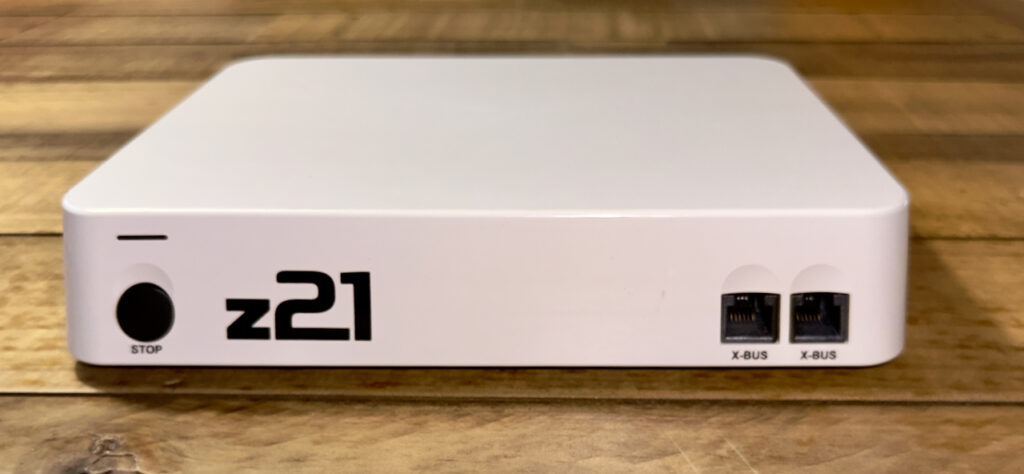
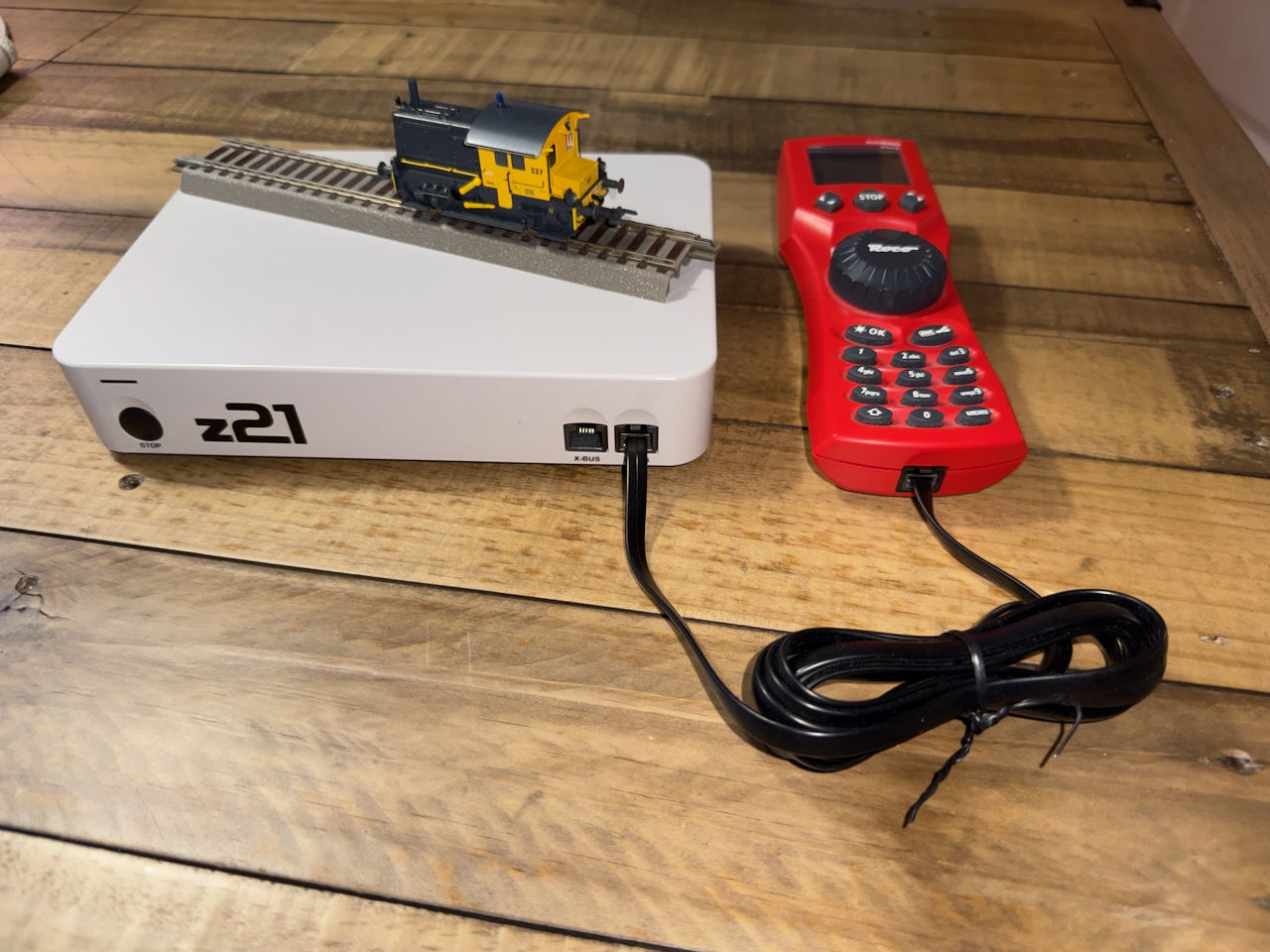
    The front side of the z21 (white) with the 2 X-bus connectors.
    The front side of the z21 (white) with the 2 X-bus connectors.

    Throttle

    The Z21 has two X-bus ports on the front side. The black Z21 has an additional third X-bus port on the back side. These buses implement the XPressNet interface for throttles as developed by Lenz.

    As a throttle the following alternatives can be used:

    • MultiMAUS. This is a handheld device that can physically be connected to the X-bus.
    • WLAN MAUS. The same device as the MultiMAUS that connects wirelessly to the Z21 via Wifi (provided that the network interface on the Z21 is enabled)
    • Third-party throttle. Any throttle that supports the XPressNet protocol can be connected to the X-bus.
    • Z21 app. An app on iPhone or iPad (or Android) where one can set up a layout with all turnout for accessories in place, and control locomotives. This also requires connection via the network interface
    • Computer. Existing programs like iTrain, TrainController and Rocrail support the Z21. As long as a computer has a network connection, any program or script that implements the documented communication protocol can interact with the Z21.

    Feedback

    Manual train control relies on visual feedback. Imagine controlling a locomotive on the layout without seeing it, e.g. when the train is in a longer tunnel or the room would be dark. Likewise, feedback is essential when automating train control.

    The Z21 includes the R-bus for connecting devices that can give two types of feedback:

    • Occupancy detection. This type of devices detect whether an isolated section of a layout is occupied by a locomotive, by measuring a current between the two rails. After all, even a stopped locomotive uses at least a small current for the decoder.
    • Permanent or temporary contact. This type of devices detect whether a switch is on or off. Some rail types have a built-in switch that triggers when a wheel passes. Others have a reed contact that closes when a magnet mounted to the bottom of rolling stock passes. Typical for this feedback is that it is concentrated on a single point rather than a section of a layout.
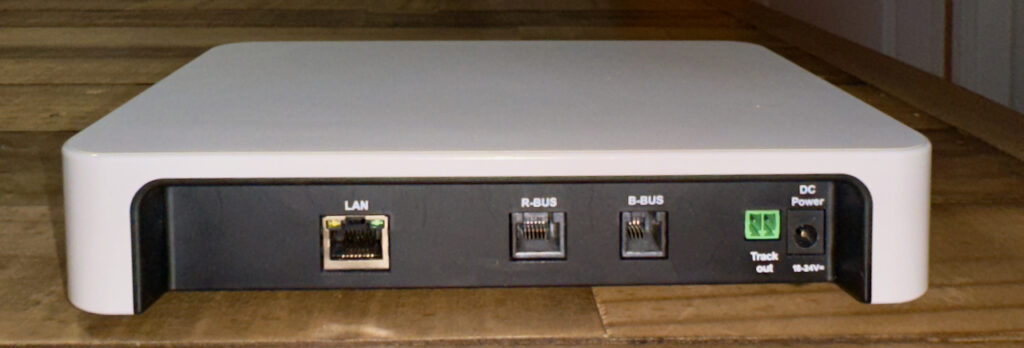
    The back side of the z21 (white) with the LAN socket, R-bus and B-bus connectors.
    The back side of the z21 (white) with the LAN socket, R-bus and B-bus connectors.

    Z21 (black)-only functionality

    Parallel to XPressNet, Digitrax developed LocoNet as a throttle protocol. The Z21 (black) has an L-bus for integrating in a LocoNet environment.

    In the domain of automation within vehicles, CAN bus was developed as a bus standard for communication between various electronic control units (ECUs). Within the context of model railroad control, this is an emerging standard that enables RailCom, a two way communication standard between the command center and locomotives. The Z21 (black) has support for this via its CAN-bus.

    Network protocol

    Roco implemented the network interface as a tunnel for XPressNet with feedback, LocoNet and RailCom commands and responses. It is easy to recognize the individual messages as well as the categories they belong to, when we will start implementing relevant parts of the protocols for our own experiments.

    Note: each network enabled version of the Z21 (as well as the WLAN package) includes a Wifi router. The reason is that the Z21 has a fixed IP-address 192.168.0.111 out of the box. In order to connect to the Z21, it needs to be in a 192.168.0 subnet. The included Wifi router provides this subnet. If you have an existing network that provides the same subnet, you can connect your Z21 directly to your network. Otherwise, you can continue to use the included Wifi router, or use it once to connect to your Z21 and configure its IP address of your Z21 to match the subnet of your network.

  • First Post!

    Here we are… a new blog! Not quite my first attempt for a new blog and I don’t know exactly where I want to go with this. Just like with my previous attempts, a totally empty website feels quite intimidating indeed!

    For now, suffice to say that this blog is rendered by WordPress. What you see is the result of your browser rendering HTML code with some CSS and embedded JavaScript. Your browser is running locally on your computer, phone or tablet.

    All this was served by:

    • NGINX, a web server that generated this code by executing a series of:
    • Static PHP scripts that together implement this WordPress website. The scripts pulled the content of this blog from a:
    • MariaDB database server that manages everything that I write, as well as a number of settings that control the formatting.

    This web server with WordPress scripts as well as the database are hosted at a web hotel somewhere on the internet.

    As an aside: I had played around with local WordPress installations, i.e. blogs that had the whole thing running on my own computer. One of the first things I want to figure out is how to copy a blog from a local installation to a hosted installation and vice versa.

    But first I’ll take some time to dig deeper into how WordPress works. To be continued!